Convert Images To PDF – Tool
How To Convert Images To PDF Using Sarkari Help Bihar Image Tool?
The process of converting images to pdf is so easy, in just a couple of seconds anyone can make a pdf from images. Here are 5 steps given below:-
1) Select Images For Conversion
With the Sarkari Help Bihar Image Tool, you can select 40 maximum images for conversion at once. Just press the green button given above to select images from your mobile or pc as shown in image below:

Select images one by one or all images at once from the device. There is also an option to directly drag and drop pictures in the tool.
2) Arrange Images In Desired Order For PDF
Moving further, Selected images will appear on the screen. Click on any image and drag it to arrange it in sequence. A number will appear on the top left corner of the image which denotes the page number of the PDF file. As shown in the image below:
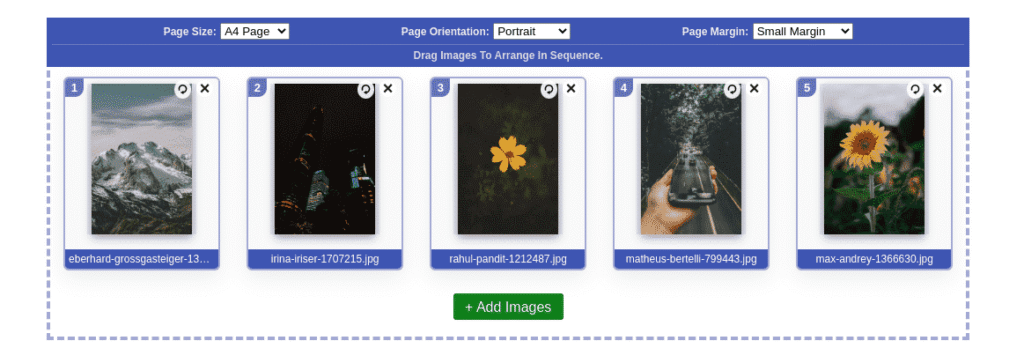
On there top right corner there are two buttons one for removing the image and the second for the rotating image in a clockwise direction.
3) Set PDF Page Size and Margin
In the third step of converting images to pdf, you have to set the page size of the pdf file. As shown in the above image from the top bar choose paper size ‘A4’ or ‘US Letter format. After that set orientation of the page and the margin of the page to ‘Low’, ‘Medium’, or ‘High’.
4) Convert Images To PDF
Next, after configurations press the ‘Convert Images to PDF’ button given above. A progress popup will appear on the screen which shows the uploading and merging progress of the PDF document.

5) Rename And Download PDF File
After Processing, A new page will open. If you want to rename your pdf then enter a name in the input field given below the PDF file. Next click on the ‘Download’ button and you are done.

So with there simple 5 steps, you can Convert any of your images to pdf with the Sarkari Help Bihar Image Tool.